

Almost every outpatient EHR in 2026 ships with some kind of built-in terminology layer. Most of them work fine for the basic cases: looking up an ICD-10 code from a search box, returning a value set for a prescription dropdown, formatting a CPT code on a claim. The question is whether the built-in layer is enough, or whether the practice needs a dedicated FHIR terminology server alongside.
This comparison walks through where the built-in path stops being enough and a dedicated server pays for itself. For additional FHIR write-ups for outpatient IT, the related write-ups carry the picture further.
What the Built-In Layer Actually Covers
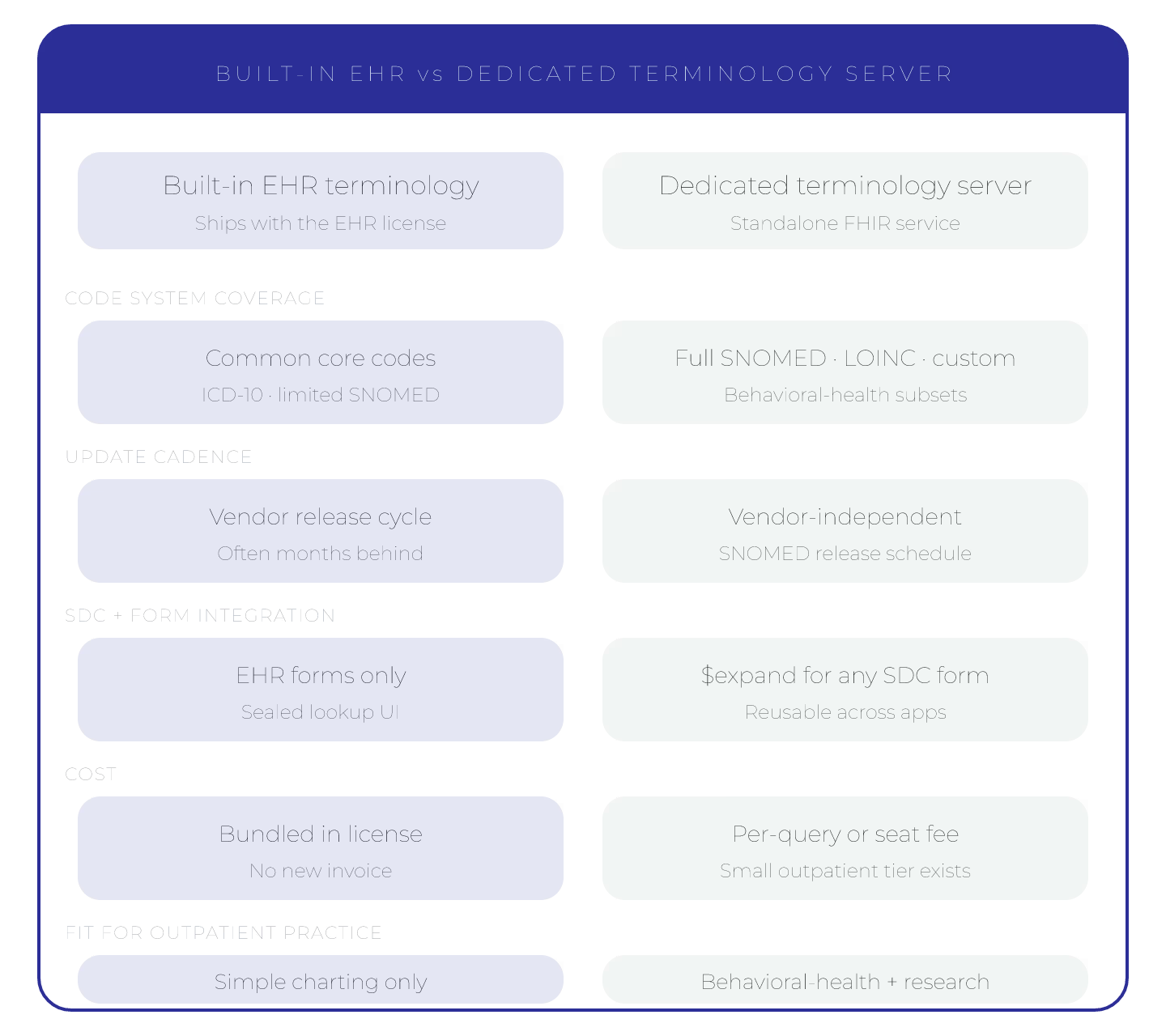
Built-in EHR terminology covers, in most products:
- A code lookup UI that finds codes by name or partial code.
- Pre-loaded value sets for common forms and billing flows.
- An update path that follows the EHR's own release schedule.
That set is enough for an outpatient practice that uses one vocabulary, has no exotic mapping needs, and is fine with the EHR vendor's update cadence. Most solo practices and many small groups fit this profile.
Where the Built-In Layer Runs Out
Dedicated terminology servers earn their keep in outpatient practices when one of the following shows up:
- The practice needs
$translatebetween code systems the EHR vendor does not map natively, like DSM-5 to ICD-10. - The practice runs a custom intake form layer that needs
$expandon value sets the EHR did not pre-load. - The practice needs more frequent code-system updates than the EHR's release schedule provides.
- Reporting or research queries need direct access to terminology data outside the EHR's UI.
Each of those scenarios on its own can be worked around. When two or three show up together, a dedicated server stops being a luxury. The choosing a FHIR terminology server for outpatient behavioral health 2026 guide covers what a dedicated server looks like in practice.
Cost and Operations
The built-in path is cheaper. Nothing new gets purchased, nothing new gets operated, and the IT footprint stays flat. The trade-off is the limits of what the EHR vendor supports.
A dedicated server costs money or labor, depending on whether the practice picks a commercial managed service or a self-hosted open-source option. The trade-off is real flexibility on the terminology side, including the ability to load custom value sets, update content on the practice's own schedule, and expose terminology through clean FHIR endpoints.
For most outpatient practices below a certain complexity, the built-in path is the right default. The threshold to add a dedicated server is usually a specific workflow that the built-in layer cannot support, not a general feeling that the EHR is limiting.
How to Tell the Threshold Has Been Reached
Three signs show up reliably in outpatient practices that need a dedicated server:
- A workflow has a manual code lookup step that should be automatic.
- A value set in the EHR is consistently out of date relative to the source content.
- A custom integration is maintaining its own copy of a code system because the EHR's terminology API does not expose what is needed.
When two of those are present at the same time, a dedicated server pays back the investment within a quarter. The top 4 cloud terminology services for small outpatient clinics is the natural next read on the cloud pick.
The right answer is rarely about which path is better in general, and almost always about which one fits the workflows the practice runs today.
Sources
- Terminology Service spec (evergreen) - HTML, HL7 FHIR build
- JPA Server terminology module (evergreen) - HTML, HAPI FHIR docs
- FHIR Terminology Services 101 - Video talk, Dion McMurtrie, DevDays 2024
